Adsence750x90

Saturday, July 4, 2020

Export to Excel using OpenXml


Some situations we need to export data in Excel format. I had such situation couple of years back and I created a repository in my bitbucket account.

I thought it may be help for some one who is looking for same kind of solution while programming.

Here is the repository url
https://bitbucket.org/makhaai/exporttoexcel/src/master/ 


for Git Clone
git clone https://makhaai@bitbucket.org/makhaai/exporttoexcel.git


This includes there project. One model Library, One Service Library and a MVC project. 


Basically we can plug  List data in to it and download it as Excel document 


   public FileContentResult Download() {

            List> listOfSheets = new List>() {
                    new ExcelSheet() {
                     Records =Data.GetProducts(),
                     SheetName = "ProductList 1"
                },
                 new ExcelSheet() {
                     Records =Data.GetProducts(),
                     SheetName = "ProductList 2"
                },
            };

            var excelBytes = _iExcelWriterService.GetExcelInBytes(listOfSheets);
            var fileName = string.Format("{0}_{1}.xlsx",
                                      "Products_", DateTime.Now.ToString("MMddyyyyHHmmssfff"));
            return excelBytes != null ? File(excelBytes,
                                             "application/vnd.openxmlformats-officedocument.spreadsheetml.sheet",
                                              fileName) : null;
        }

Online typing tool


Apologies, I was out of track in a while. I will be starting my blogging again for good.
Last couple of month I was working on some of my personal project. couple of them will be online in weeks. 
One project I wish to discuss now. Its EazyTyping.com, Its a online typing tool that uses google translation API and it having one typing game for users. Uses can mainly type Hindi, Malayalam, Guajarati etc.

Feel free to comment.

Thank you


Tuesday, June 14, 2016

Covariance, Contravariance and Invariance


Covariance and contravariance are terms that refer to the ability to use a less derived (less specific) or more derived type (more specific) than originally specified. Generic type parameters support covariance and contravariance to provide greater flexibility in assigning and using generic types. When you are referring to a type system, covariance, contravariance, and invariance have the following definitions. The examples assume a base class named Base and a derived class named Derived


Covariance

Enables you to use a more derived type than originally specified.
You can assign an instance of IEnumerable<Derived> (IEnumerable(Of Derived) in Visual Basic) to a variable of type IEnumerable<Base>.

Contravariance

Enables you to use a more generic (less derived) type than originally specified.
You can assign an instance of IEnumerable<Base> (IEnumerable(Of Base) in Visual Basic) to a variable of type IEnumerable<Derived>.

Invariance

Means that you can use only the type originally specified; so an invariant generic type parameter is neither covariant nor contravariant.
You cannot assign an instance of IEnumerable<Base> (IEnumerable(Of Base) in Visual Basic) to a variable of type IEnumerable<Derived> or vice versa.


Read more

Covariance and Contravariance in Generics

What is covariance and contravariance in c# ?

Thursday, February 26, 2015

Entity Framework 7 - EF7

Entity Framework is the popular ORM framework from Microsoft.  EF7 is the next major version of Entity Framework and is still in the early stages of development and it supports Windows Store, Windows Phone and the Cloud Optimized .NET well as Mono, on both Mac and Linux, In EF7 Microsoft will be enabling providers that target non-relational data stores, such as Azure Table Storage.

EF7 will be a lightweight and extensible version of Entity Framework that just pulls forward the commonly used features. In addition, we’ll be able to include some commonly requested features that would have been difficult to implement in the existing code base, but can be included from the start in EF7.

We’ll be keeping the same patterns and concepts that you are used to in Entity Framework, except where there is a compelling reason to change them. You’ll see the same DbContext/DbSet based API but it will be built over building block components that are easy to replace or extend as needed – the same pattern we’ve used for some of the isolated components we’ve added in recent EF releases.

INTRODUCING: The Future of .NET on the Server  


Read More

https://github.com/aspnet/EntityFramework/wiki/What-is-EF7-all-about
http://blogs.msdn.com/b/adonet/archive/2014/10/21/ef7-what-does-code-first-only-really-mean.aspx
http://blogs.msdn.com/b/adonet/archive/2014/05/19/ef7-new-platforms-new-data-stores.aspx

Wednesday, August 13, 2014

How to create CAPTCHA in MVC 5


As a developer you probably aware of CAPTCHA, It is a type of challenge-response test used in computing to determine whether or not the user is human [CAPTCHA]
In development time we want to implement some CAPTCHA functionalists in your website, Lets check How can we do that


Basic idea is
  1. Create a image with some letters
  2. Save that letters in session or cache 
  3. Display our image in web page with textbox
  4. Validate TextBox value and letter what we saved in session
Then How to create an Image?

Function to create image
 
        /// <summary>
        /// Create image Byte[]
        /// </summary>
        /// <returns></returns>
        public byte[] DrawByte()
        {
            byte[] returnByte = { };
            Bitmap bitmapImage = new Bitmap(150, 30, PixelFormat.Format32bppArgb);

            //
            // Here we generate random string
            string key = getRandomString();
            
            //
            // key string adding to Session
            HttpContext.Current.Session.Add(SessionKey, key);

            //
            // Creating image with key
            using (Graphics g = Graphics.FromImage(bitmapImage))
            {
                g.SmoothingMode = SmoothingMode.HighQuality;
                Rectangle rect = new Rectangle(0, 0, 150, 30);
                HatchBrush hBrush = new HatchBrush(HatchStyle.SmallConfetti, Color.LightGray, Color.White);
                g.FillRectangle(hBrush, rect);
                hBrush = new HatchBrush(HatchStyle.LargeConfetti, Color.Red, Color.Black);
                float fontSize = 20;
                Font font = new Font(FontFamily.GenericSerif, fontSize, FontStyle.Strikeout);
                float x = 10;
                float y = 1;
                PointF fPoint = new PointF(x, y);
                g.DrawString(key, font, hBrush, fPoint);

                using (MemoryStream ms = new MemoryStream())
                {
                    bitmapImage.Save(ms, System.Drawing.Imaging.ImageFormat.Jpeg);
                    returnByte = ms.ToArray();
                }
            }
            return returnByte;
        }

Now we can chck the function to create session value or random string
        /// <summary>
        /// Generate random string value
        /// </summary>
        /// <returns></returns>
        private string getRandomString() {

            string returnString = string.Empty;
            string letters = "ABCDEFGHIJKLMNOPQRSTUVWXYZabcdefghijklmnopqrstuvwxyz0123456789";

            Random rand = new Random();

            int length = rand.Next(5, 8);
            for (int i = 0; i < length; i++)
            {
                int pos = rand.Next(0, 62);
                returnString += letters[pos].ToString();
            }
            return returnString;
        }
Here I am usign one Controller to create Image.. check below for to see my Controller
namespace CaptchaMVC.Controllers
{
    public class CaptchaController : Controller
    {
        //
        // GET: /Captcha/
        public ActionResult Index()
        {
            CaptchaHelper captchaHelper = new CaptchaHelper();
            return File(captchaHelper.DrawByte(), "image/jpeg");
        }
 }
}
From the View you call
<div class="form-group">
            <span class="control-label col-md-2"></span>
                <div class="col-md-10">
                    <img src="@Url.Action("Index","Captcha")" alt="image" />
                </div>
        </div>
I this example I created a Person Controller and displaying and validating captcha image when someone create a new person. Here I am not including everything but you can download and check the whole code
//
        // POST: /Person/Create
        [HttpPost]
        public ActionResult Create(PersonViewModel person)
        {
            try
            {
                CaptchaHelper captchaHelper = new CaptchaHelper();
                bool success = captchaHelper.Verify(person.Captcha);
                if (success)
                { 
                    //captcha success
                }

                // TODO: Add insert logic here

                return RedirectToAction("Index");
            }
            catch
            {
                return View();
            }
        }
-- Happy Coding--
Download Sample

Tuesday, August 12, 2014

Paging In MVC 5 with Entity Framework

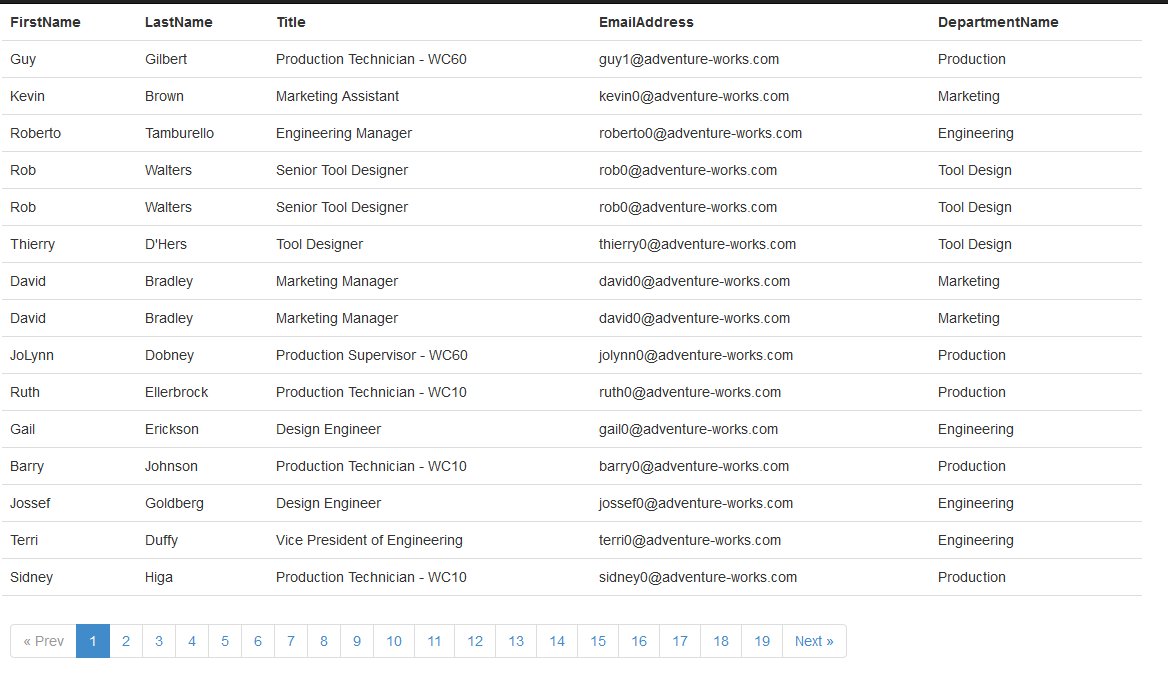
How to do Paging in MVC You can find lot of examples for paging in MVC with Entity Framework in internet. I am adding one more example. In this example you can see one partial page for paging control and ViewModel for called Pager. Here I am using AdventureWorks database Employee table to page Empoyees Following is ViewModel class, data that you need to pass to the view. Class constructor have IQueryable Datasource, It hold the data and return DataSource, TotalCount,PageSize currentpage and TotalPages. 


public class Pager<T>:List<T>
    {
        public int TotalPages { get; set; }
        public int CurrentPage { get; set; }
        public int PageSize { get; set; }
        public int TotalCount { get; set; }

        public Pager(IQueryable<T> dataSource, int pageIndex, int pageSize, int totalCount)
        {
            TotalCount = totalCount;
            CurrentPage = pageIndex;
            PageSize = pageSize;
            TotalPages = (int)Math.Ceiling(TotalCount / (double)PageSize);
            this.AddRange(dataSource);
        }
    }
Model and DataContext class
 public partial class EmployeeContext : DbContext
    {
        public EmployeeContext()
            : base("name=AdventureWorksConnectionString")
        {
        }

        public virtual DbSet<DimEmployee> DimEmployees { get; set; }
        protected override void OnModelCreating(DbModelBuilder modelBuilder)
        {
        }
    }
In Model class I am not included all the columns, Just added only columns I need..
[Table("DimEmployee")]
    public partial class DimEmployee
    {
        [Key]
        public int EmployeeKey { get; set; }
        public string FirstName { get; set; }
        public string LastName { get; set; }
        public string Title { get; set; }
        public string EmailAddress { get; set; }
        public string DepartmentName { get; set; }
    }
EmployeeContext class return Data from database, I already Installed Entity Framework from Package Manager, But in this example I am calling one stored procedure to get the data using EF. Its for I am not taking the whole data from database.. Just taking what I want to display. Here we need to pass the limit of data we want.
USE [AdventureWorksDW2008R2]
GO
/****** Object:  StoredProcedure [dbo].[getEmployeeByPageNumber]    Script Date: 08/12/2014 14:24:29 ******/
SET ANSI_NULLS ON
GO
SET QUOTED_IDENTIFIER ON
GO
-- =============================================
-- Author:  <Raju Melveetilpurayil>
-- Create date: <Create Date,,>
-- Description: <Get rows by row between limit>
-- =============================================
ALTER PROCEDURE [dbo].[getEmployeeByPageNumber]
 -- Add the parameters for the stored procedure here
 @Start INT,
 @End INT,
 @TotalCount INT OUTPUT
AS
BEGIN
 -- SET NOCOUNT ON added to prevent extra result sets from
 -- interfering with SELECT statements.
 SET NOCOUNT ON;
SELECT @TotalCount=COUNT(*) FROM dbo.DimEmployee
SELECT [EmployeeKey]
      ,[FirstName]
      ,[LastName]
      ,[Title]
      ,[EmailAddress]
      ,[DepartmentName] FROM 
(
 SELECT ROW_NUMBER() OVER(ORDER BY EmployeeKey) ROW_NUM, * FROM DimEmployee
 ) AS K
 WHERE ROW_NUM >@Start AND ROW_NUM <=@End
  
END

Now we can see our MVC pages. Here is a partial page it only meant to display paging controls. The advantage of this control and model are generic, so we can pass any datasouce to do paging.
    @{ double _pageCount = ((double)((Model.TotalCount-1) / Model.PageSize)); int pageCount = _pageCount - (Math.Round(_pageCount)) != 0 ? (int)(_pageCount + 1) : (int)_pageCount; // // disable class for next and previous button if there is no previous and next string classNameForNext = Model.CurrentPage == _pageCount ? "disabled" : string.Empty; string classNameForPrevious = Model.CurrentPage == 1 ? "disabled" : string.Empty; }
  • @if (classNameForPrevious == string.Empty){ @Html.ActionLink("« Prev", "Index", new { page = (Model.CurrentPage - 1) })} else{ « Prev}
  • @for (int pages = 1; pages <= pageCount; pages++) { // //adding active class to current page string active = ""; if (pages == Model.CurrentPage) { active = "active"; }
  • @Html.ActionLink(pages.ToString(), "Index", new { page = pages })
  • }
  • @if (classNameForNext == string.Empty){ @Html.ActionLink("Next »", "Index", new { page = (Model.CurrentPage + 1) })} else{ Next » }

form the Index.cshtml we pass Model to the partial page. From the Model partial page read class properties TotalPage,CurrentPage.. and generate page numbers and next and previous buttons Passing Model to partial Page
<tr>
     <td colspan="5">
        @Html.Partial("_PagingPartial",Model)
     </td>
</tr>
Ok Now we can see the whole Index.cshtml
@model EFMVCSample.ViewModel.Pager<EFMVCSample.Models.DimEmployee>
@{
    ViewBag.Title = "Employee";
}
<table class="table">
         <tr>
            <th>FirstName</th>
            <th>LastName</th>
            <th>Title</th>
            <th>EmailAddress</th>
            <th>DepartmentName</th>
        </tr>
            @foreach (EFMVCSample.Models.DimEmployee employee in Model.AsQueryable().ToList())
            {
                <tr>
                    <td>@employee.FirstName</td>
                    <td>@employee.LastName</td>
                    <td>@employee.Title</td>
                    <td>@employee.EmailAddress</td>
                    <td>@employee.DepartmentName</td>
                </tr>
            }
    <tr>
        <td colspan="5">
            @Html.Partial("_PagingPartial",Model)
        </td>
    </tr>
</table>
So we can see PagingController to see how controller works
public class PagingController : Controller
    {
        private List<DimEmployee> AllEmpoyees { get; set; }

        //
        // GET: /Paging/
        public ActionResult Index(int? page)
        {
            int pageno = 0;
            pageno = page == null ? 1 : int.Parse(page.ToString());

            int pageSize = 15;
            int totalCount = 0;


            using (var db = new EmployeeContext())
            {
                int limitEnd = pageno * pageSize;
                int limitStart = limitEnd - pageSize;

                //
                //calling stored procedure to get the total result count

                var start = new SqlParameter("@Start", limitStart);
                var end = new SqlParameter("@End", limitEnd);

                //
                // setting stored procedure OUTPUT value
                // This return total number of rows, and avoid two database call for data and total number of rows 
                var spOutput = new SqlParameter
                {
                    ParameterName = "@TotalCount",
                    SqlDbType = System.Data.SqlDbType.BigInt,
                    Direction = System.Data.ParameterDirection.Output
                };

                //
                //calling stored procedure to get paged data.
                AllEmpoyees = db.Database.SqlQuery<DimEmployee>(
                                                "getEmployeeByPageNumber @Start,@End,@TotalCount out",
                                                start, end, spOutput)
                                                .ToList();

                //
                // setting total number of records
                totalCount = int.Parse(spOutput.Value.ToString());

            }
            Pager<DimEmployee> pager = new Pager<DimEmployee>(AllEmpoyees.AsQueryable(), pageno, pageSize, totalCount);
            return View(pager);

        }
 }
Depend on page number, Controller create pageno,pageSize and call stored procedure to get data between limit.
 var spOutput = new SqlParameter
                {
                    ParameterName = "@TotalCount",
                    SqlDbType = System.Data.SqlDbType.BigInt,
                    Direction = System.Data.ParameterDirection.Output
                };

//
//calling stored procedure to get paged data.
AllEmpoyees = db.Database.SqlQuery<DimEmployee>("getEmployeeByPageNumber @Start,@End,@TotalCount out",start, end, spOutput).ToList();
Download example